Helpful References:
•EQuIS Format Definition Configuration
EQuIS Link allows users to load source data tables and create data mappings from the source data table to sections and fields in a specified EQuIS Format file. An EQuIS Link Project Template can be configured in EQuIS Enterprise to act as a “virtual” format using the EDP EDD Upload Widget to process data. When a "virtual" format is configured, records are created in the ST_CONFIG table that define the format and its associated EQuIS Link Project Template.
Before configuring Link for use in Enterprise, users must first:
1.Create an EQuIS Link Project Template.
2.Map the data from the source file to the desired EQuIS Format.
Note: This functionality requires an active Link license. |
A Link Project Template can be configured for use with a specified format in:
•Professional EDP (see the Configuring EQuIS Link Virtual Formats in Professional EDP article) or
Below is an example of records in the ST_CONFIG table that define a virtual format.
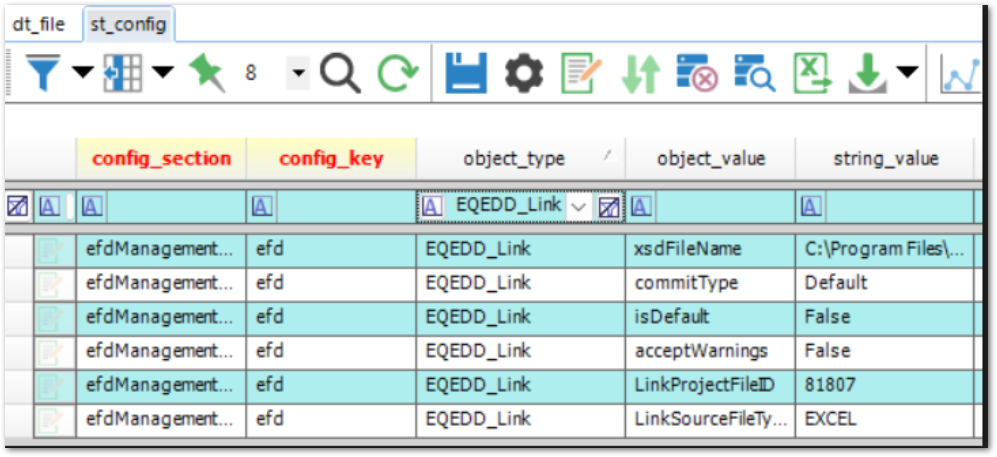
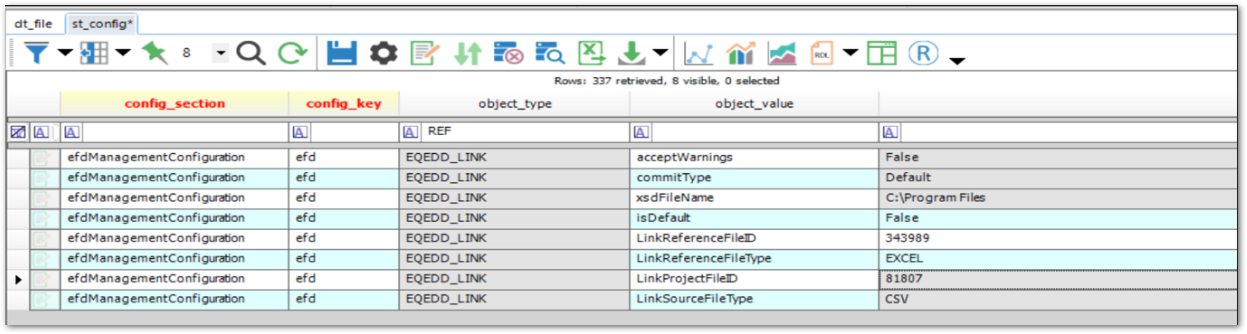
If using a Link reference data file and the Workflow widget, create additional records directly in the ST_CONFIG table, using the same CONFIG_SECTION, CONFIG_KEY, and OBJECT_TYPE values from the records already created from the Workflow widget:
1.OBJECT_VALUE = LinkReferenceFileID;
STRING_VALUE = [DT_FILE.FILE_ID] for the Link reference file
2.OBJECT_VALUE = LinkReferenceFileType;
STRING_VALUE = [file type of the Link reference file from the same list of valid values as seen in LinkSourceFileType above]
Example:
Incorrect configurations may result in the following errors in the Enterprise EDP EDD Status widget:
Error 1:
EDD File xxxxxx.zip Rejected - No Data Found
Your EDD file 'xxxxx.zip' has been rejected because no valid data were found. Please make the necessary corrections before resubmitting the EDD.
CAUSE: An extra space ' ' at the end of the OBJECT_VALUE record in the ST_CONFIG table.
Error 2:
Error starting Agent [FileProcess]: Exception has been thrown by the target of an invocation.
System.Reflection.TargetInvocationException: Exception has been thrown by the target of an invocation. ---> System.Configuration.ConfigurationErrorsException: File management configuration not found, Can't connect to database. System.IO.InvalidDataException: End of Central Directory record could not be found.
CAUSE: A .link Link project file loaded in the DT_FILE table and registered in the ST_CONFIG table instead of a .zip file.
Error 3:
Error Process Agent alert – Configuration Error
Error occurred while loading data: [Source File] System.Exception: Invalid Link Virtual Format setting for: [Unique Format Name from step 5 of configuring the ‘virtual’ format], error: dt_dfle.content issue LinkReferenceFileID att EarthSoft.Collect.Link.Helpers.LinkHelper.UseLinkInEntEdp(String formatName, Boolean linkSettingsValid, String linkSettingsError, String linkProjectFileName, DataSourceType linkDataSourceType, String linkReferenceFileName, DataSourceType linkReferenceFileType) at EarthSoft.Workflow.Clients.Default.DefaultFileProcess.PerformAction(ReservedTaskInfo taskInfo, TaskReservationMonitor taskReservationMonitor)“
Cause: A reference file was loaded in the DT_FILE table unzipped and registered in the ST_CONFIG table.