This method calculates the instant flow (m3/sec) within a stream at a given location, by summing the flow measurements of several subsections of the stream at a specific location using actual field measurements of subsection width, subsection depth and subsection flow velocity.
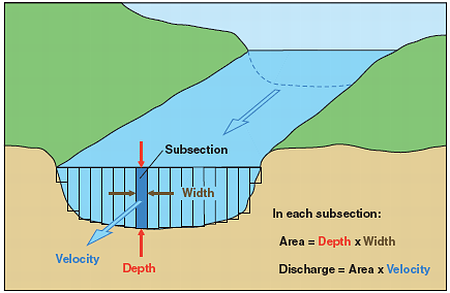
With this method, subsection measurements are made at each location (SYS_LOC_CODE) for depth (m), width (m) and velocity (m/sec) and input into the FLOW_MEASUREMENT tab in EDGE or the EDD. The ‘interval flow’ or ‘discharge’ for each subsection is calculated by EDP or EDGE, using the equations:
Equation B. i) Subsection Discharge, m3/sec (interval_flow) = (Subsection Depth (m) X Subsection Width (m)) X Subsection Velocity (m/sec)
The ‘instant flow’ or discharge for the location (SYS_LOC_CODE) is calculated using the equation:
Equation B. ii) Instant Flow (m3/sec) = Sum (interval_flow) for a specific date and SYS_LOC_CODE combination.
1.Populate EDD in EDGE.
a.In EDGE, open the ‘Flow_Measurement’ tab.
b.Enter field measurements for a specific location (SYS_LOC_CODE) and date.
Note: The MEASUREMENT_DATE_TIME and SYS_LOC_CODE can be identical if the STATION is unique. A row will automatically be created in the ‘Flow’ tab for each unique date and SYS_LOC_CODE combination. |
c.Select 'STREAMFLOW' as the FLOW_METHOD.
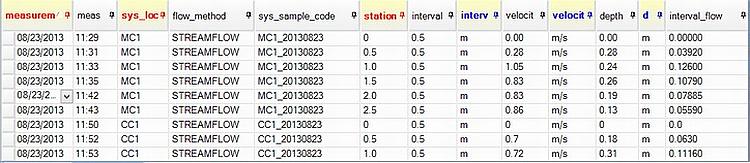
d.Measurements and units for STATION, INTERVAL, VELOCITY and DEPTH must be entered.
e.The column INTERVAL_FLOW will automatically populate on entry of these fields.
f.A value for FLOW.INSTANT_FLOW will automatically be populated based on Equation B ii above.
g.A value for FLOW.VELOCITY will be automatically populated based on Equation B iii below.
h.The FLOW.REMARK column will be populated with ‘EDP populated instant_flow; EDP populated velocity’.
Equation B. iii) FLOW.VELOCITY = Average FLOW_MEASUREMENT.VELOCITY for each unique SYS_LOC_CODE and date combination.
Example of EDGE Flow Interface

2.Open EDD in EDP.
3.The data can then be created and committed, which will populate the EQuIS tables DT_FLOW, DT_FLOW_MEASUREMENT, DT_SAMPLE and DT_FIELD_SAMPLE.